ShopDreamUp AI ArtDreamUp
Deviation Actions


Suggested Deviants


Suggested Collections


You Might Like…


Featured in Groups



Description
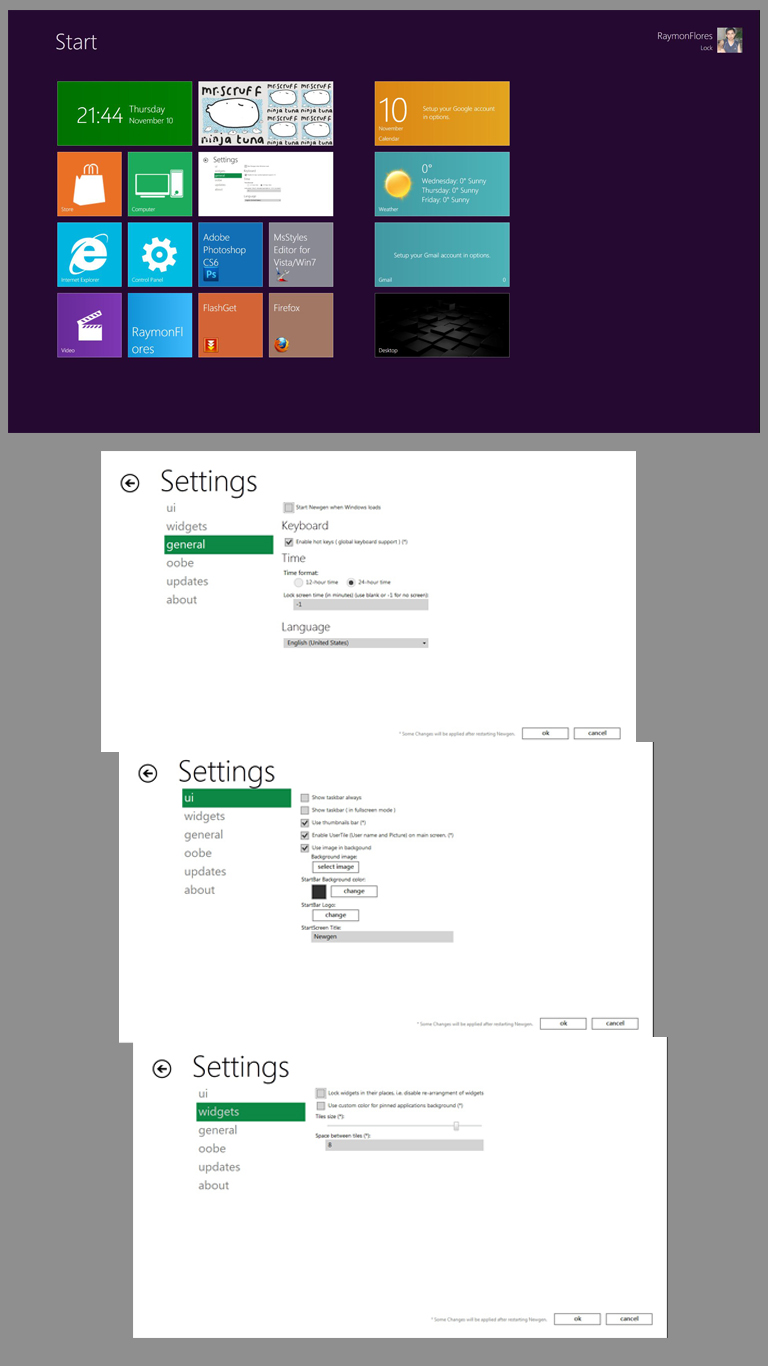
Newgen [link] is an application that brings the new Metro UI to your desktop.
It is a set of live widgets/tiles that shows some content from the web and some from your PC.
Newgen supports WPF, HTML5, and HTML widgets.
Note: you must install .netframework4 to use this app.
NEWGEN TEAM:
RAYMON E. FLORES = graphics designer / developer
NEERAJ DURGAPAL = web designer / main developer
================================
Release Notes
5.0 // Stable
================================================
Fixed -
Minor bugs
Introduced -
Direct Update feature
StartScreen Slide-Show feature (as per under OOBE)
Option to use your own image as logo for Start button
Updated -
Store Widget now is more faster and more stable
Improved Pictures widget. Clicking picture thumb will show preview (like on videowidget). It has previous/next buttons also
Changed Video widget ui and added previous/next buttons
Updated settings hub. Changed ui and added slide transition effect
Changed transition effect (to slide effect) on clicking Desktop widget
=======================
6.1 // Stable = September 18, 2011
================================================
Fixed -
Minor bugs
Animation not working
Introduced -
Right-Click options on UserTile
New Search Hub
New Theme
Updated -
Search hub
Settings hub
All widgets that has options hub
Newgen Team widget
Improved animations
Changed bg of people widget hub
Changed name "people widget" to "socialite widget"
=========================================
8.0 // Stable = November 10, 2011
Fixed:
Minor bugs
Performance update
Introduce:
Option to Refresh
Option to Lock dragging of tiles
UI, Gfx
Mouse scrolling on startscreen
Removed gradient colors on tiles
========================================
NOTE: PLEASE ALWAYS CHECK FOR UPDATES. (SETTINGS HUB - UPDATES - CLICK CHECK FOR UPDATES)
For developers -
See documentation / widget development api reference for more info.
See Newgen Team Widget also.
NOTE
===============================
You must uninstall previous version of Newgen before installing this.
----------------------------
SPECIAL THANKS TO:
 [link]




----------------------------
CREDITS: [link]
It is a set of live widgets/tiles that shows some content from the web and some from your PC.
Newgen supports WPF, HTML5, and HTML widgets.
Note: you must install .netframework4 to use this app.
NEWGEN TEAM:
RAYMON E. FLORES = graphics designer / developer
NEERAJ DURGAPAL = web designer / main developer
================================
Release Notes
5.0 // Stable
================================================
Fixed -
Minor bugs
Introduced -
Direct Update feature
StartScreen Slide-Show feature (as per under OOBE)
Option to use your own image as logo for Start button
Updated -
Store Widget now is more faster and more stable
Improved Pictures widget. Clicking picture thumb will show preview (like on videowidget). It has previous/next buttons also
Changed Video widget ui and added previous/next buttons
Updated settings hub. Changed ui and added slide transition effect
Changed transition effect (to slide effect) on clicking Desktop widget
=======================
6.1 // Stable = September 18, 2011
================================================
Fixed -
Minor bugs
Animation not working
Introduced -
Right-Click options on UserTile
New Search Hub
New Theme
Updated -
Search hub
Settings hub
All widgets that has options hub
Newgen Team widget
Improved animations
Changed bg of people widget hub
Changed name "people widget" to "socialite widget"
=========================================
8.0 // Stable = November 10, 2011
Fixed:
Minor bugs
Performance update
Introduce:
Option to Refresh
Option to Lock dragging of tiles
UI, Gfx
Mouse scrolling on startscreen
Removed gradient colors on tiles
========================================
NOTE: PLEASE ALWAYS CHECK FOR UPDATES. (SETTINGS HUB - UPDATES - CLICK CHECK FOR UPDATES)
For developers -
See documentation / widget development api reference for more info.
See Newgen Team Widget also.
NOTE
===============================
You must uninstall previous version of Newgen before installing this.
----------------------------
SPECIAL THANKS TO:
[link]----------------------------
CREDITS: [link]
Comments154
Join the community to add your comment. Already a deviant? Log In

wheres the desktop button